
How to do your bookkeeping safely without a tax advisor in 7 clear steps
Many self-employed people ask themselves: can I do my bookkeeping safely without a tax advisor (Steuerberater)? For most sole proprietors and freelancers the answer is yes, provided the system is right. The real fear is rarely the work itself, but the mistakes. A wrong tax rate, a missing receipt, a forgotten deadline: the Finanzamt makes no exceptions. Yet doing your own bookkeeping is no black magic; above all it is a question of the right approach.
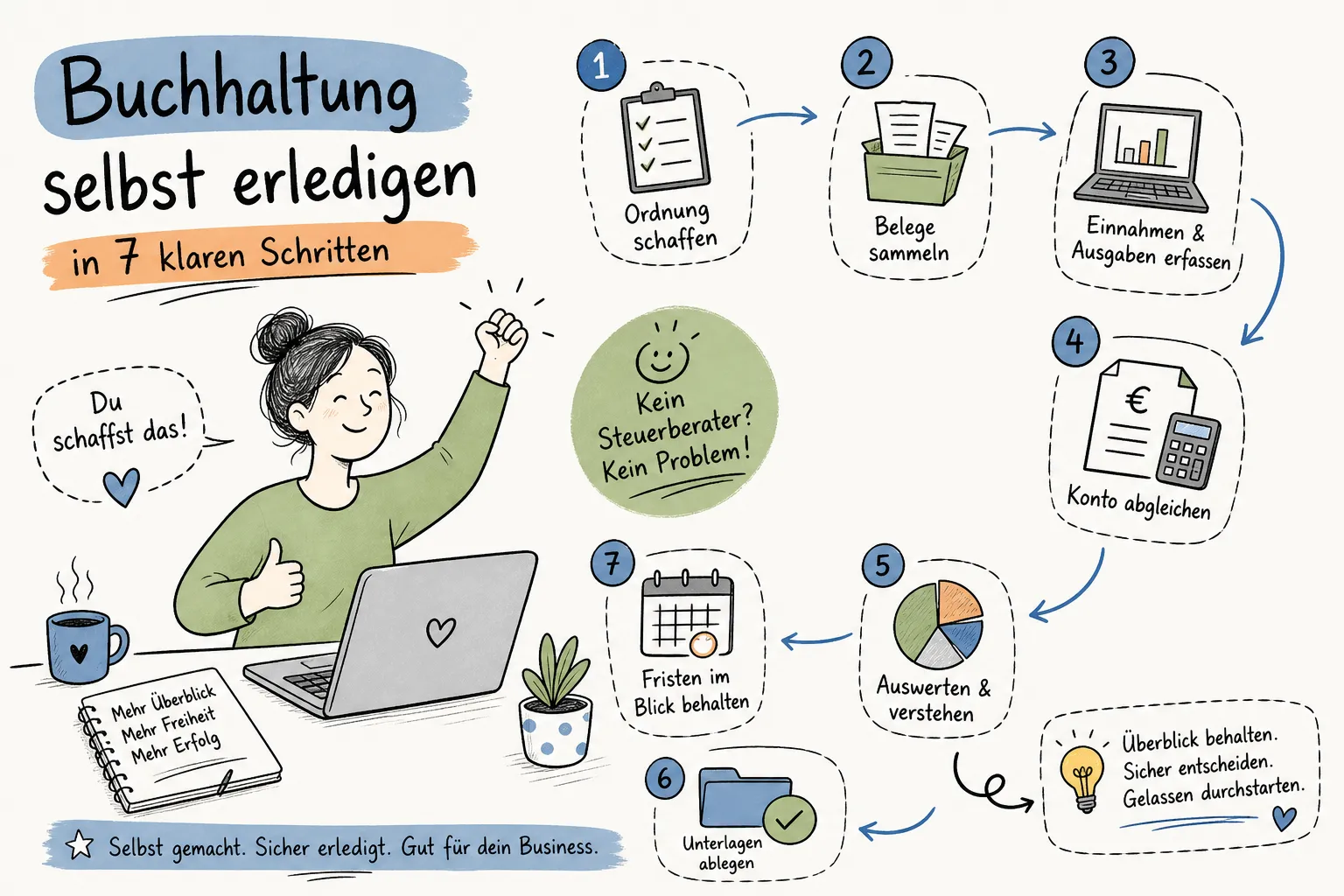
This guide shows you the seven concrete steps with which you handle your bookkeeping without a tax advisor yourself: safely, in compliance with the law and saving time. It ranges from recording receipts through the advance VAT return (Umsatzsteuer-Voranmeldung) to preparing the year-end. If you use suitable accounting software that automates many of these steps, you can reduce the effort to a few hours a month. You will also learn which pitfalls are particularly common and from when a tax advisor really makes sense.
Bookkeeping without a tax advisor: laying the foundation (steps 1 and 2)
Before you record your first entry, you have to make two decisions: what you legally owe and what you work with. If you set up this base cleanly, you save yourself a lot of rework later.
Which bookkeeping obligation really applies to you
As a freelancer or sole proprietor in Germany, the cash-basis income statement (Einnahmenüberschussrechnung, EÜR) is usually enough. Full double-entry bookkeeping is only required by law above an annual turnover of more than 800,000 euros or a profit of over 80,000 euros (§ 141 AO). If you use the small business scheme (Kleinunternehmerregelung), you are only exempt from VAT, not from the duty to keep records. All income and expenses must still be documented.
You also have to clarify your VAT status: standard taxation (Regelbesteuerung) or Kleinunternehmerregelung, and accrual-based (Soll) or cash-based (Ist) VAT. These decisions determine which forms you file and how you structure your entries.
Choosing the right accounting software for the self-employed
A good tool really replaces several work steps here. Kontelio was developed for exactly this use case: as a cloud-based solution in 9 languages, German included, with a simplified mode that shows only the functions you currently need. Many such solutions offer automatic EÜR creation, ELSTER integration for the advance VAT return and GoBD-compliant receipt archiving, features that considerably simplify the most laborious parts of bookkeeping without a tax advisor.
For choosing software: the EÜR and the advance VAT return must be included. An ELSTER connection and support for XRechnung and ZUGFeRD are strongly recommended in 2026, as the legal requirements for e-invoicing are rising step by step. Once you have set this up properly, it then runs largely automatically.
GoBD and retention periods: what has applied since 2025
New retention periods have applied since 2025. Accounting vouchers, i.e. incoming and outgoing invoices as well as expense receipts, now only have to be kept for eight years. Books and annual financial statements still have to be kept for ten years. Digital archiving is allowed, but the documents must remain unalterable, complete and readable at all times (cf. GoBD rules, BMF).
Scan thermal paper receipts immediately, and never replace the original files of e-invoices with a simple printout. That sounds petty, but it is the point where most problems arise in a tax audit (Betriebsprüfung).
Steps 3 and 4: recording receipts and assigning entries correctly
With the right system, ongoing receipt recording can often be limited to around one hour per week; depending on the volume of receipts it can be more. Without a system it costs you days at the end of the year.
Digitising receipts completely and storing them GoBD-compliantly
The basic rule is: no entry without a receipt. Every receipt gets its date, supplier, amount and payment method immediately on receipt. A consistent file naming scheme helps enormously, for example following the pattern “YYYY-MM-DD_Supplier_Amount_EUR.pdf”. Enter cash transactions in the cash book daily, not at the end of the month.
If a receipt is missing, request a copy from the supplier straight away. Modern accounting software like Kontelio lets you upload and photograph receipts directly in the application and archives them GoBD-compliantly. That way no backlog of receipts builds up that costs you hours in January.
Categorising income and expenses correctly
Check every transaction with five questions before booking it:
- What was bought or sold?
- Was it used for business, privately or for both?
- Is it an expense, income or a fixed asset?
- Which VAT applies?
- Which account represents the transaction appropriately?
A laptop is not automatically office supplies: it can be a fixed asset that is depreciated over several years. Private payments from the business account are private withdrawals, not business expenses. Devices used for both purposes must be split with a traceable private share. These distinctions sound trivial, but they are the most common sources of error in bookkeeping without a tax advisor.
Monthly routine for bookkeeping without a tax advisor (steps 5 and 6)
If you close consistently once a month, you have hardly any effort left at the end of the year. If you put it off, you create a problem that grows every month.
Keeping the bank reconciliation and the running EÜR up to date
In the first week of the following month, close the previous month completely. Assign every bank transaction to an entry and a receipt. Match incoming payments with outgoing invoices, supplier payments with incoming invoices. At the end, a simple check: does the balance in the software match the actual account balance?
If so, the month is clean. Record unexplained transactions in a clarification list; never simply book them to a suspense account. This one step at the beginning of the month saves more time than any other optimisation.
Filing the advance VAT return on time via ELSTER
The advance VAT return is due monthly or quarterly and must be transmitted electronically by the 10th of the following month. Check beforehand: all outgoing invoices recorded with the correct tax rate, all incoming invoices checked for valid mandatory details (Pflichtangaben), special cases such as the reverse charge procedure or intra-community transactions taken into account.
Good accounting software creates the return directly from the booked data and transmits it to the Finanzamt via ELSTER: no media break, no manual filling in of forms. The transmission log serves as proof of filing on time. Kontelio offers this workflow as an integrated part from the Business plan.
Step 7: year-end closing and e-invoicing
If you have booked cleanly all year, you can handle the year-end closing in one long afternoon, not in a week.
Preparing the year-end closing systematically
In January, record all December receipts, check the cut-off between the old and the new year, and record open receivables and payables as of the closing date. Record fixed asset additions completely and check depreciation. Then provide the summary trial balance, the annual VAT account and the lists of debtors and creditors.
If you only bring in a tax advisor for the annual tax return, at this point you hand over a tidy data set and directly save advisory costs. Cleanly booked data is the cheapest form of tax advice.
Issuing e-invoices correctly in ZUGFeRD and XRechnung format
Since 2025, businesses in the B2B sector have been obliged to be able to receive e-invoices, and the obligation to issue them is being phased in. From 2027 it applies to businesses with a prior-year turnover of more than 800,000 euros, from 2028 to all domestic businesses (according to the BMF announcement on the EN 16931 implementation). ZUGFeRD and XRechnung are the valid formats in Germany: machine-readable data structures, not a simple PDF.
The structured XML data part must be archived just like the visible version. Accounting software that supports both formats, Kontelio among them, creates e-invoices directly from the invoicing module and can process incoming e-invoices with automatic data capture. If you set this up now, you are already prepared for the upcoming stages of the obligation.
The most common mistakes when doing your own bookkeeping
Most problems arise not from ignorance, but from habits that settle in unnoticed.
Receipt errors and wrong categorisation
Five mistakes are particularly common: expenses are booked without a receipt. Thermal paper receipts fade in the pile. Private expenses end up in the software as business expenses. The business purpose is missing on the entertainment receipt. And the cash book is kept weekly instead of daily, which immediately stands out in a tax audit.
The solution is a fixed daily recording moment, even if it only takes two minutes. Consistency beats perfection: a complete system with small daily steps is more stable than an elaborate system that you use three times a year.
VAT traps the Finanzamt will not overlook
19 and 7 percent are mixed up. Input VAT is deducted from invoices that lack the mandatory details. The Kleinunternehmerregelung is applied incorrectly on outgoing invoices. The reverse charge procedure is forgotten for EU services. Each of these sources of error can trigger a back tax payment plus interest.
Before every entry, answer one clear question: which tax code applies to this specific transaction, and why? If you cannot answer this question immediately, look it up briefly before booking instead of correcting afterwards.
When a tax advisor still makes sense
Bookkeeping without a tax advisor works very well for many self-employed people. However, there are situations in which professional support is cheaper than a later correction.
Clear limits of doing your own bookkeeping
As a rough rule of thumb: up to an annual turnover of about 40,000 to 60,000 euros and with a simple activity without staff, good software is usually enough. Above this threshold a tax advisor pays off economically for most people: VAT, investments, several types of income and more complex transactions pile up. If you employ staff, do business abroad or run a GmbH, you should plan for professional support from the start.
Incidentally, there is no legal obligation in Germany to hire a tax advisor. Once you are required to prepare balance sheets, i.e. above 800,000 euros turnover or 80,000 euros profit (§ 141 AO), doing your own bookkeeping without support is hardly practicable any more, though.
How software makes working with a tax advisor easier
If you only bring in a tax advisor for the year-end closing or for special cases, you benefit twice from structured work of your own. Cleanly booked data, complete receipts and a finished EÜR reduce the advisory effort considerably. Many accounting programs offer the option of giving the tax advisor direct read access to the bookkeeping data: no exports, no email attachments. In Kontelio, tax-advisor access is free from the Business plan and has its own role.
The software thus bridges the gap between doing all your bookkeeping yourself and selective expert support. You keep control and hand over exactly when it really makes sense.
Conclusion: bookkeeping without a tax advisor is no risk if the system is right
Bookkeeping without a tax advisor is quite feasible for many self-employed people once the system is in place. The seven steps in this guide cover everything you need as a sole proprietor or freelancer: from clarifying your obligations and choosing software, through ongoing receipt recording and categorisation, to the monthly advance VAT return via ELSTER and a clean year-end closing with e-invoices in ZUGFeRD and XRechnung.
The most important factor is consistency, not perfection. Record receipts immediately, close monthly, keep deadlines in your calendar. If you use software that creates the EÜR automatically, connects directly to ELSTER and archives receipts GoBD-compliantly, you can noticeably reduce the monthly effort. Kontelio was developed for exactly this workflow: clearly structured, geared to GoBD, ELSTER and e-invoicing, and usable even without prior bookkeeping knowledge.
Try it and decide for yourself whether bookkeeping really has to be as laborious as many fear. You can test Kontelio free for 30 days without a credit card and set up your system step by step along the way.
More about the matching Kontelio feature: Self-employed
Step by step in the Kontelio user manual: Bookkeeping in 7 steps
As of: October 2026. General information, not tax advice.