
Accounting Software for Small Businesses: How to Choose Right

Good accounting software for small businesses reliably handles four tasks: writing invoices (soon as an E-Rechnung, i.e. e-invoice, for almost everyone), recording and archiving receipts in line with the GoBD (principles for proper electronic bookkeeping), preparing the Einnahmenüberschussrechnung and the Umsatzsteuer (VAT), and sending the data to the Finanzamt (local tax office) via ELSTER (official e-filing portal). Which program suits you depends less on a ranking than on three sober questions: What bookkeeping obligations do you have, are you a Kleinunternehmer (small business owner under the small-business VAT scheme) or subject to standard taxation, and do you do your taxes yourself or with a tax firm? In this guide, we go through the obligations, the selection criteria, the types of software and the costs, and give you a plan to put any solution through its paces in 30 days.
In brief
- Most small businesses are allowed to calculate their profit using the EÜR (cash-basis income/expense statement). Your software must prepare the Anlage EÜR properly; you often don't need double-entry bookkeeping.
- Since 2025, all businesses must be able to receive e-invoices; issuing them becomes mandatory step by step from 2027 and 2028. ZUGFeRD and XRechnung therefore belong in every program.
- What matters day to day is capturing receipts by photo, deadline reminders and an interface you enjoy opening. Software you avoid ends up costing more than any subscription fee.
- According to market comparisons, cloud solutions cost between just over €7 and more than €50 per month. Test with real receipts before you buy.
Table of contents
- Which obligations your software must cover
- Seven criteria that really matter day to day
- Software types compared
- What accounting software costs
- The right decision in 30 days
- Our view: simplicity beats a feature list
- Try Kontelio free for 30 days
- Frequently asked questions
- Sources
Which obligations your software must cover
Before you compare features, clarify what the law requires of you. Many founders buy too much software because they want to meet obligations that don't even apply to them. Others buy too little and only notice at their first Umsatzsteuer-Voranmeldung (UStVA, periodic advance VAT return).
EÜR or double-entry bookkeeping
Sole traders without a commercial register entry and Freiberufler (independent professionals) generally don't have to prepare a balance sheet. Under § 141 AO, double-entry bookkeeping only becomes mandatory when annual turnover exceeds 800,000 euros or profit exceeds 80,000 euros. Below that, the Einnahmenüberschussrechnung is sufficient: business income minus deductible business expenses, transferred to the Anlage EÜR (official EÜR form). What exactly it asks for is shown in the ELSTER help on the Anlage EÜR, from general information about the business to the profit calculation with adjustments.
For choosing software, this means: if you are entitled to use the EÜR, you don't need a program with a balance sheet module, fine-grained chart of accounts control and annual financial statements. You need a solution that categorizes income and expenses cleanly, takes AfA (depreciation for wear and tear) into account and produces the Anlage EÜR from it. We explain how the EÜR is structured in detail in the guide Preparing the EÜR: Anlage EÜR and AfA. GmbHs, UGs and registered merchants, on the other hand, prepare balance sheets regardless of turnover and usually work with a tax firm.
Kleinunternehmer or standard taxation
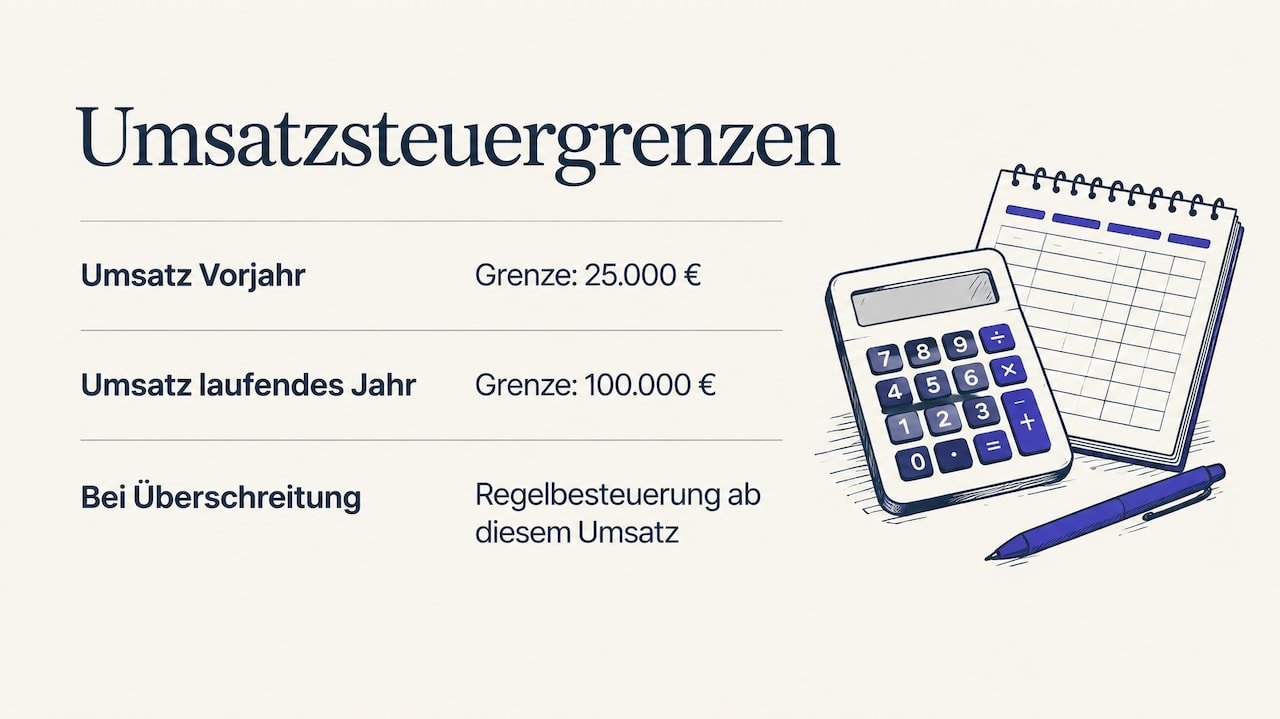
The second fork in the road is VAT. With the Jahressteuergesetz 2024 (Annual Tax Act 2024), the Kleinunternehmerregelung (small-business VAT scheme) was redrafted as of 1 January 2025: since then, the turnover of Kleinunternehmer is VAT-exempt, and the limits are 25,000 euros turnover in the previous year and 100,000 euros in the current year. If the second limit is exceeded during the year, Regelbesteuerung (standard VAT taxation) applies from that transaction onwards.
As a Kleinunternehmer, you don't show VAT on invoices and don't deduct input VAT. Your software must then above all produce correct invoices with the note on the tax exemption and keep an eye on your turnover against the limits. As soon as you are subject to standard taxation, UStVAs, input VAT from incoming invoices and the Umsatzsteuererklärung (annual VAT return) are added. By then at the latest, a program that creates the UStVA directly from your entries pays off. We have compiled the pros and cons of the scheme in our article on the Kleinunternehmerregelung 2026.
E-invoicing: the deadlines for small businesses
The biggest change of recent years is the e-invoice in business between domestic companies. According to the Federal Ministry of Finance, since 1 January 2025 e-invoicing generally applies to transactions between domestic businesses, with transition periods for issuing:
| Period | What applies |
|---|---|
| since 1 January 2025 | All businesses must be able to receive and process e-invoices |
| until 31 December 2026 | Paper and PDF invoices are still permitted when issuing |
| until 31 December 2027 | Transition for businesses with a maximum of 800,000 euros prior-year turnover |
| from 1 January 2028 | Issuing e-invoices mandatory for everyone in B2B business |
Kleinunternehmer are exempt when it comes to issuing, but receiving affects them too. A plain PDF from a word processor is not an e-invoice. What is meant are structured formats such as XRechnung (German e-invoice format) or ZUGFeRD (hybrid e-invoice format), which software can read automatically. We explain the differences in XRechnung, ZUGFeRD, Peppol: e-invoice formats explained. Anyone choosing accounting software today should only consider solutions that create both formats and display incoming e-invoices in readable form.
Seven criteria that really matter day to day
Rankings often evaluate hundreds of individual points. One large founders' portal, for example, works with 141 selection criteria ranging from usability to support. For a small business, most of these can be condensed into seven questions:
- GoBD compliance and archive. The software must store receipts immutably and traceably, with a log of every change. Ask about audit-proof archiving throughout the statutory retention periods.
- E-invoicing in both directions. Create XRechnung and ZUGFeRD, receive, display and post incoming e-invoices.
- Capturing receipts by photo. The quality of text recognition varies greatly. A comparison of accounting software advises checking during the trial whether date, amount and tax rate are reliably recognized, because weak recognition creates rework.
- Tax output. EÜR, UStVA and annual return directly from the entries, ideally with submission via ELSTER, without retyping in the portal.
- Collaboration with the tax firm. If you work with a tax advisor, ask them first which export format they need. If a suitable export is missing, the firm re-enters the bookings, and you pay for it.
- Usability and language. An interface you can understand in five minutes on a Friday afternoon is worth more than twenty add-on modules. If you or your team prefer to work in a language other than German, multilingual operation is not a luxury but a way to avoid errors.
- Deadlines and reminders. UStVA, payment terms, open items: good software reminds you before the Finanzamt or a customer does.
One criterion is deliberately missing: price. It belongs at the end of the evaluation, not at the beginning. The difference between two plans is often just a few euros a month; the difference in the time you spend on receipts every week is measured in hours.
Software types compared
Instead of comparing individual products, it's worth looking at the type of solution. For small businesses, there are essentially five options:
| Solution type | Strengths | Weaknesses | Suitable for |
|---|---|---|---|
| Spreadsheet | free, flexible | not GoBD-safe, no archive, no e-invoicing, no ELSTER submission | at most the first few weeks |
| Pure invoicing program | fast, lean | no expenses, no EÜR, no VAT | side businesses with very few receipts |
| Classic desktop program | extensive features, local data | installation, updates, tied to one device, often steep learning curve | businesses with fixed workstations and experience |
| Tax-firm-oriented system | closely linked to the tax advisor | little independent tax output, more for balance-sheet preparers | GmbH and UG with a tax firm mandate |
| Cloud all-in-one solution | invoicing, receipts, EÜR, VAT and ELSTER in one tool, access from anywhere | ongoing subscription | self-employed people and small businesses who do their own bookkeeping |
People who are just starting out often underestimate how quickly a spreadsheet reaches its limits: by the first tax audit or the first incoming XRechnung at the latest, traceability is lacking. A pure invoicing program, in turn, only covers half the job, as we show in more detail in our comparison of invoicing programs for Kleinunternehmer. For most small businesses that are not required to prepare a balance sheet, the cloud all-in-one solution is the most balanced option.
When switching is worth it
Many small businesses start with a spreadsheet or a lean invoicing program and switch later. Typical triggers are the move from the Kleinunternehmerregelung to standard VAT taxation, the first incoming XRechnung from a major customer, or a year-end closing for which receipts have to be gathered from three folders. The best time to switch is the beginning of a fiscal year or of a UStVA period, because you then don't have to split entries. Export your customer and supplier data beforehand and back up your existing archive completely, because the retention obligation also applies to old records.
What accounting software costs
According to Buchhaltung Test, cloud-based accounting programs in 2026 typically cost between 7.90 euros and more than 50 euros per month, depending on how much is automated and which interfaces are included. Entry-level plans for small businesses often start at around 10 euros per month.
Factor three things into every offer:
- Annual instead of monthly payment. Many providers give a significant discount for annual payment. This pays off once you're sure after the trial.
- Additional costs. Some plans charge extra for receipt capture, bank connection, additional users or receiving e-invoices. Read the plan details, not just the headline.
- Your time. If you save two hours a month, at an hourly rate of 60 euros that is worth more than the price of almost any plan.
For comparison, our own plans as listed on the pricing page:
| Plan | Monthly | Annual |
|---|---|---|
| Start | 9,90 € | 99 € |
| Business | 22,90 € | 199 € |
| Pro | 32,90 € | 299 € |
With annual payment, Start therefore costs €99 instead of €118.80 for twelve monthly payments. You can see which features are included in which plan on the Kontelio pricing page.
The right decision in 30 days
A demo shows what software can do. A test with your own receipts shows whether it suits you. Here's how to make the most of a trial period:
- Days 1 to 3: Set up basic data. Company details, Steuernummer (tax number), Kleinunternehmer or standard taxation, invoice template with logo. Measure how long this takes.
- Days 4 to 10: Write a real invoice. Ideally as an e-invoice in ZUGFeRD format. Check all mandatory details and whether the numbering is sequential.
- Days 11 to 20: Photograph receipts. Take ten to twenty real receipts, including a crumpled fuel receipt and an invoice with two tax rates. Count how often you have to make corrections.
- Days 21 to 25: Look at the reports. Does the software produce a comprehensible EÜR preview or UStVA? Do you understand the figures without a manual?
- Days 26 to 30: Decide. Did you enjoy opening the software? If not, it's the wrong one, no matter how well it performs in tests.
If you have never done your own bookkeeping before, you'll find the process from the first receipt to the tax return in our step-by-step plan for bookkeeping without a tax advisor.
Our view: simplicity beats a feature list
Every day we see where bookkeeping in small businesses fails. Rarely because of a missing module, almost always because of the shoebox: receipts piling up because the program is too cumbersome to open between two client appointments. That's why we built Kontelio so that daily work is done in just a few steps: photograph the receipt, write the invoice, done. The tax side, i.e. the EÜR, UStVA and annual return, is generated from this data and goes directly to the Finanzamt via the ELSTER connection.
Two things are particularly important to us. First, the software should adapt to your business and not the other way round: a design studio books differently from a craft business or an online retailer. Second, many self-employed people and founders in Germany don't have German as their first language. Tax terms are difficult enough in German. Those who can keep their books in their own language make fewer mistakes and procrastinate less. That's why Kontelio can be used in multiple languages.
And we believe that nobody should buy accounting software without having tested it with real receipts. That's why we offer 30 days free of charge and without a credit card.
— Paulo
Try Kontelio free for 30 days
Kontelio combines invoices, e-invoices in ZUGFeRD and XRechnung, receipt capture by photo, legally compliant archiving, EÜR, VAT and submission via ELSTER in one interface, multilingual and with deadline reminders. You test it free for 30 days without a credit card, and if Kontelio isn't right for you, you simply cancel at no cost. If it fits, choose Start, Business or Pro, monthly or annually. You'll find all details and plans on the pricing page, and more about the software at Accounting software for the self-employed.
Frequently asked questions
Which accounting software is suitable for sole traders?
For most sole traders without an obligation to prepare a balance sheet, a cloud all-in-one solution that covers invoices, receipts, EÜR and VAT and submits via ELSTER is the right fit. You only need a balance sheet module if you exceed the limits under § 141 AO or are entered in the commercial register. Look for e-invoicing capability and an interface you will actually work with.
Is an invoicing program mandatory for Kleinunternehmer?
The law does not prescribe a specific program. However, since 2025 Kleinunternehmer must also be able to receive e-invoices, and receipts must be retained in line with the GoBD. That is hard to do properly with a word processor and folders; software makes it much easier.
Can I do the bookkeeping myself as a small business?
Yes, if you are entitled to use the EÜR, it is quite manageable. Fixed routines are important: record receipts weekly, write invoices immediately, keep an eye on deadlines. For questions about special VAT cases, foreign transactions or a change of legal form, you should consult a tax advisor.
Is Excel enough for a small business's bookkeeping?
For a quick overview, yes; as long-term bookkeeping, no. A spreadsheet does not log changes immutably, cannot read e-invoices and submits nothing to the Finanzamt. By the time you have to file the UStVA at the latest, the effort outweighs the savings.
Sources
- IHK Würzburg-Schweinfurt: Bookkeeping obligations for business founders
- ELSTER: Help on the Anlage EÜR
- Federal Ministry of Finance: Special scheme for Kleinunternehmer, BMF-Schreiben of 18 March 2025
- Federal Ministry of Finance: Questions and answers on e-invoicing
- Für-Gründer.de: Accounting software comparison
- Buchhaltung Test: Accounting software comparison 2026
Recommendations
This article was machine-translated from German. Only the German version is authoritative.