
Automating Bookkeeping: How to Build a System That Lasts
If you want to automate your bookkeeping, you don't need a major IT project. A clear path is enough: receipts land digitally in one fixed place, invoices are created from templates, and the software prepares Umsatzsteuer (VAT) and the EÜR (cash-basis income/expense statement) from the recorded data and submits them via ELSTER (official e-filing portal). The review stays with you. This guide shows which tasks self-employed people and small businesses in Germany can sensibly automate, which legal requirements set the pace in 2026, and how to document your workflows before the switch so that automation really saves time.
In brief
- Process first, then the tool: Write down how receipts reach you today and who does what. Only then choose the software.
- Automation pays off for repetitive tasks: Invoices, receipt capture, archiving, the Umsatzsteuer-Voranmeldung (UStVA, periodic advance VAT return) and deadlines are the biggest time wasters and the best candidates.
- The law is pushing too: Since 2025, businesses must be able to receive E-Rechnungen (e-invoices), the UStVA can only be filed electronically via ELSTER, and records must be kept in compliance with the GoBD (principles for proper electronic bookkeeping).
- Control remains the boss's job: Automation does not replace the monthly look at figures and allocations. Schedule a fixed appointment for it.
- Start small: One month with a clean workflow achieves more than a perfect system that is never finished.
Table of contents
- What can and cannot be automated in bookkeeping
- The legal framework in 2026: E-Rechnung, GoBD and ELSTER
- Six steps to automated bookkeeping
- Documenting workflows so the automation lasts
- One month in an automated workflow: an example
- Typical mistakes when automating
- Our view: automation starts with clarity, not technology
- Try Kontelio free for 30 days
- Frequently asked questions
- Sources
What can and cannot be automated in bookkeeping
Automated bookkeeping means: the software handles recurring work steps, while you continue to make the decisions. The following overview shows where the leverage lies for a typical sole trader or small business.
| Task | Manual (typical) | Automated | What you still do yourself |
|---|---|---|---|
| Writing invoices | Word or Excel template, number assigned by hand | Template with customer data, sequential number and mandatory invoice details | Check service and amount |
| E-invoices | PDF by email, recipient has to retype it | Output in a structured format (ZUGFeRD, XRechnung) | Agree the format with the customer |
| Capturing receipts | Paper piles, shoebox, binders | Photo upload right after purchase, digital filing | Assign the receipt to a category and check it |
| Archiving | Binders in the basement, files on the desktop | Audit-proof digital filing | Delete nothing before the retention period has expired |
| Umsatzsteuer-Voranmeldung (UStVA) | Gather figures, type them into Mein ELSTER | Values from the bookkeeping, submission via the ELSTER interface | Check before sending |
| EÜR at year-end | Catch up on everything in February | Prepared continuously from recorded income and expenses | Check depreciation and special cases |
| Deadlines | Calendar, memory, reminder letters from the Finanzamt (local tax office) | Automatic reminders | Meet the deadline |
What cannot sensibly be automated: the question of whether an expense is business-related, whether a supply is VAT-exempt, or how to split an item used for both business and private purposes. Here you decide, if in doubt together with your tax advisor. Good software takes the typing and searching off your hands, not the thinking.
The legal framework in 2026: E-Rechnung, GoBD and ELSTER
In Germany, automation has long ceased to be merely a question of convenience. Three sets of rules make a digital workflow practically a prerequisite.
E-Rechnung: everyone must receive them, and soon send them too
Since 1 January 2025, new rules apply to invoices between domestic businesses. The Federal Ministry of Finance explains in its questions and answers on the E-Rechnung how the obligation under § 14 UStG was reworded for transactions from that date. According to IHK München, the obligation to receive e-invoices also applies to Kleinunternehmer (small businesses under the small-business VAT scheme). For sending, there are transition periods based on the previous year's turnover. Exactly when which group has to switch is summarised in our guide on the e-invoicing mandate 2025, 2027 and 2028.
Important for automation: a simple PDF is not an e-invoice. An e-invoice must allow electronic processing, as stated in the BMF (Federal Ministry of Finance) circular on the introduction of the mandatory e-invoice. That is precisely the advantage: structured data no longer has to be retyped. We explain the differences between the formats in XRechnung, ZUGFeRD and Peppol compared.
GoBD and retention periods
Under § 147 of the Abgabenordnung (AO, German Fiscal Code), books, records and accounting vouchers must be kept in an orderly manner, in such a way that they are available, readable and machine-analysable throughout the entire retention period. For invoices, § 14b UStG stipulates that you must keep a copy of the invoices you issue and all invoices you receive. With the Fourth Bureaucracy Relief Act, the retention period for accounting vouchers was shortened from ten to eight years. Which document must be kept for how long can be found in our overview GoBD and retention periods 2026.
For your system, this means: a folder on your laptop in which files can be renamed or overwritten is not enough. Digital filing must make changes traceable. Also, only delete receipts once you are sure that no period is still running, for example due to an ongoing tax audit or an objection. If you are unsure, ask your tax advisor before destroying paper originals.
ELSTER: VAT only electronically
The UStVA cannot be filed on paper or by email. The ELSTER help describes the procedure through which you submit tax returns electronically to your Finanzamt. According to the ELSTER information page for business owners, you can fill in most forms free of charge in Mein ELSTER or alternatively use software with an ELSTER interface. The second route is the automated one: the figures come straight from your bookkeeping, and you type nothing twice.
The deadlines are tight. The tax offices of Baden-Württemberg explain the filing deadlines for the advance return and the annual return: if the last day falls on a weekend or public holiday, the deadline ends on the next working day. On application, a Dauerfristverlängerung (permanent filing extension) of one month is possible. Monthly filers in particular benefit greatly from automatic reminders.
Six steps to automated bookkeeping
The most common mistake when switching: you buy software and hope it will organise the workflow. The expert authors at Haufe therefore describe automation in finance as a change in the way of working, not as a mere software update. Those who first standardise their workflows, for example when approving incoming invoices, later have a tool that grows with them. This sequence has proven effective.
- Write down the current state. Take an hour and note where receipts come from (email, post, till receipt, online account), who processes them and when. The guide from Steuerbildung.de recommends capturing the system first with pen and paper, the way it actually runs right now, not the way it should run.
- Mark the bottlenecks. Where do you search the most? Where do you forget something? Typical candidates: lost fuel receipts, invoices that only go out weeks after the service, the advance return on the evening of the deadline.
- Define the target workflow. One rule per type of receipt: “I photograph till receipts right at the checkout”, “I write invoices on the day of acceptance”, “Every first Monday of the month I check all receipts”.
- Choose software based on your requirements. Only now does the tool come in. Check whether it supports your legal form and profit calculation method (for most self-employed people, the EÜR), can create and read e-invoices, archives receipts in a GoBD-compliant way and transmits data via ELSTER. Our checklist of the most important features and the guide to choosing accounting software will help you decide.
- Set up master data properly. Customers, suppliers, invoice templates, tax rates, categories. Half an hour of care here saves corrections every week later on.
- Test for one month, then fine-tune. Run a complete month in the new system, including the advance return. Note where things get stuck and adjust the workflow. Only then is it worth importing old data or switching over further workflows.
Documenting workflows so the automation lasts
A process description sounds like something for big corporations. For a small business, it is one page of text explaining how bookkeeping works in your company. It helps when a new employee starts, when you are ill, when your tax advisor has questions, or when after six months you yourself no longer remember why you set something up that way.
The Atlassian guide to process documentation advises defining the scope first: which process is meant, where does it begin, where does it end? Practitioners also recommend treating the documentation as a living document, with clear responsibilities and simple flow sketches instead of a theoretical manual. According to the Flexbüro help page on documenting work processes, such a description improves communication because everyone knows what they do, how and why.
Here is what a process description for incoming receipts might look like:
| Field | Content |
|---|---|
| Process | Capture and file incoming receipts |
| Start | Receipt arrives (email, post, till) |
| End | Receipt is categorised, checked and archived |
| Responsible | Owner; deputy: office assistant |
| Steps | 1. Photograph and upload paper receipts immediately. 2. Upload email invoices in one batch on Friday. 3. Check category and tax rate. 4. If unclear, add a note to the receipt and clarify at the monthly appointment. |
| Deadlines | Complete by the 5th of the following month at the latest, so the advance return can be prepared on time |
| Filing | Digitally in the accounting software; destroy paper originals only after consultation |
| Last changed | Date and name |
Three such pages are usually enough: outgoing invoices, incoming receipts, month-end closing with the advance return. If you keep the documentation in the same language your team works in, it will actually be read. In mixed teams, that is no minor detail.
One month in an automated workflow: an example
A worked example shows what this looks like in everyday life. A self-employed graphic designer, liable for VAT, files monthly and calculates her profit using the EÜR.
- Ongoing: After every purchase, she photographs the receipt with her smartphone and uploads it. No paper pile, no searching in March.
- On project completion: She creates the invoice from a template. Customer data, invoice number and mandatory details are stored. For a client who requires structured invoices, she selects the appropriate e-invoice format. Which details every invoice must contain is explained in our guide on writing invoices.
- First Monday of the month, 45 minutes: She checks all receipts from the previous month, assigns anything unclear and checks open invoices.
- Before the deadline: The software reminds her of the advance return. The values come from the recorded receipts and invoices. She checks the totals and submits via ELSTER.
- Year-end: The EÜR is largely prepared because all income and expenses have already been recorded. Special cases such as depreciation remain open. How the Anlage EÜR (official EÜR form) is structured is explained in our article Filling in the Anlage EÜR.
The difference from the manual workflow lies less in individual minutes saved than in the fact that work no longer piles up. Anyone who invests three quarters of an hour every month won't face a mountain of receipts in spring.
Typical mistakes when automating
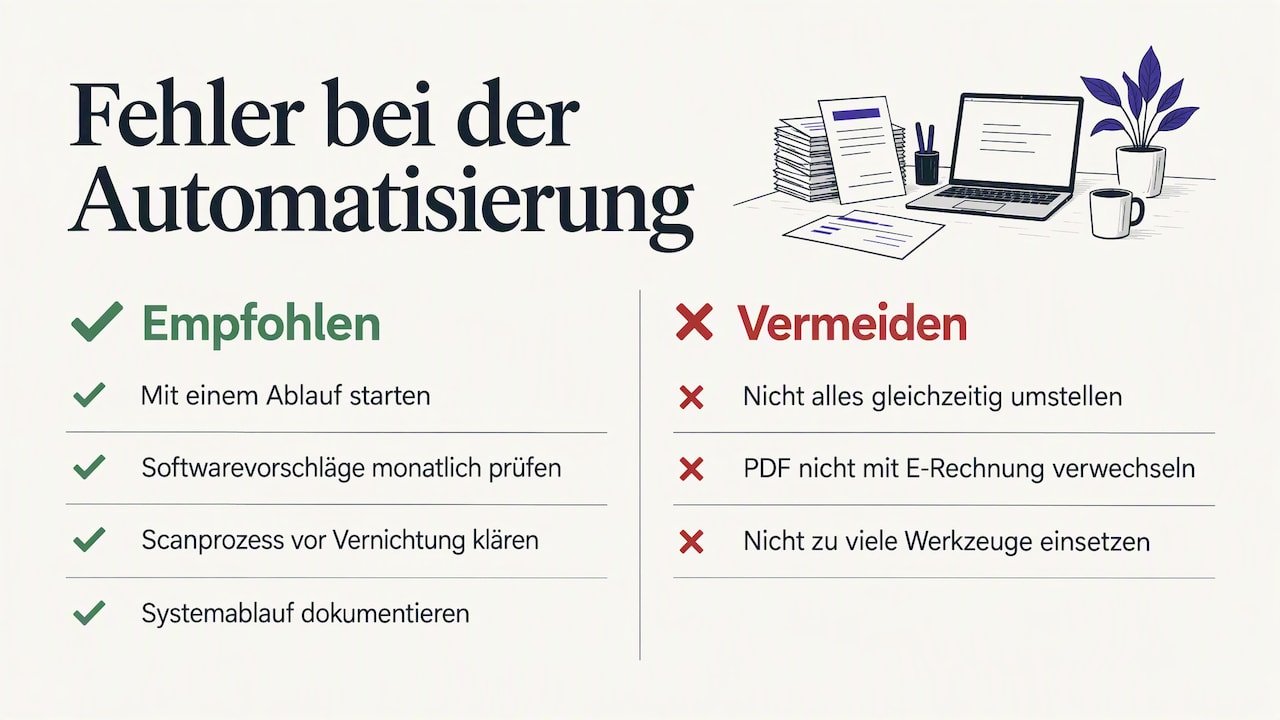
Switching everything at once. Invoicing, receipt capture, importing old data and new account allocation in one week: that is overwhelming. Start with one workflow, usually incoming receipts, and expand step by step.
Trusting the software blindly. The software's suggestions are suggestions. A wrong tax rate repeated for twelve months gets expensive. The monthly review appointment is non-negotiable.
Throwing away paper too early. Digitising does not automatically mean the original may be discarded. Check with your tax advisor whether your scanning process is sufficient before destroying paper receipts.
Mistaking a PDF for an e-invoice. A PDF sent by email does not meet the requirements for an e-invoice. Once the obligation applies to you, you need a structured format.
No documentation. If only you know how the system works, it will collapse on your first holiday.
Too many tools. One app for receipts, one for invoices, a spreadsheet for VAT: every interface is a source of errors. The more comes together in one application, the less you transfer by hand. Our accounting software comparison offers an overview of the categories of solutions.
Our view: automation starts with clarity, not technology
We develop Kontelio for self-employed people and small businesses in Germany, and we see the same pattern again and again: those who want to automate their bookkeeping often look for the one feature that does everything. It doesn't exist. What does exist is a workflow so simple that you can stick to it even in a stressful week.
That is why we consider three things crucial. First: everything in one place. Invoices, expenses, receipts, e-invoices, EÜR and VAT belong in one interface so that nothing gets lost between programs. Second: the software adapts to your business, not the other way round. A photographer needs different categories than a trade business. Third: language must not be a barrier. Many founders in Germany don't think about numbers in German. Those who can keep their books in their own language make fewer mistakes and put them off less often. That is why Kontelio can be used in several languages, while submission to the Finanzamt runs via the official ELSTER interface.
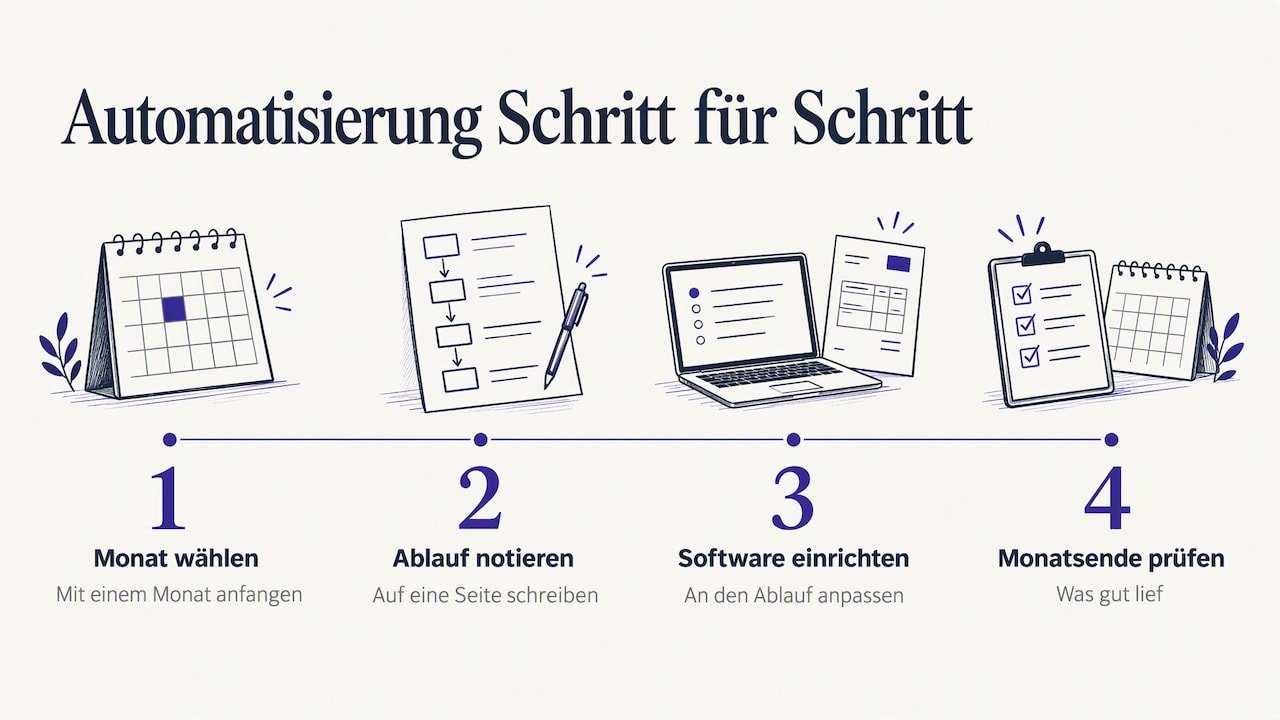
Our advice: start with a single month. Write your workflow on one page, set up your software accordingly and check at the end of the month what went well. That is already automation, and it grows with you.
— Paulo
Try Kontelio free for 30 days
Once you have defined your workflow, the next step is to test it with real receipts. With Kontelio, you write invoices and e-invoices in ZUGFeRD and XRechnung, upload receipts by photo, archive them in a legally compliant way, prepare the EÜR and Umsatzsteuer-Voranmeldung and submit your returns directly via ELSTER. Deadline reminders and customer and supplier management are included.
You can test Kontelio free for 30 days without a credit card. After that, you choose a plan: Start for €99 per year or €9.90 per month, Business for €199 per year or €22.90 per month, Pro for €299 per year or €32.90 per month. All details are on the pricing page.
Frequently asked questions
Can I fully automate my bookkeeping?
No, and that wouldn't make sense either. Capturing, filing, creating invoices, preparing tax figures and monitoring deadlines can largely be automated. Checking whether an expense is business-related and which tax rate applies remains your responsibility or that of your tax advisor.
Do I even need automated bookkeeping as a Kleinunternehmer?
Since 2025, Kleinunternehmer must also be able to receive e-invoices and keep their receipts in an orderly manner. Lean software with receipt capture and digital filing takes most of this work off your hands. Whether a plan is worthwhile for you depends on how many receipts and invoices you have per month.
How long does switching from Excel to accounting software take?
Most self-employed people can set up their master data in an afternoon. Realistically, you should plan a complete month as a test run, including one UStVA. Switching at the start of a month or quarter is easiest.
Does accounting software replace my tax advisor?
Above all, it replaces typing and searching for receipts. Many self-employed people handle their ongoing bookkeeping and advance returns themselves and seek professional advice for the annual accounts or tricky questions. For special cases such as a tax audit, an objection or a restructuring, you should always involve a tax advisor.
What is the easiest way to document my bookkeeping processes?
One page per workflow is enough: start, end, responsible persons, steps, deadlines and filing location. Keep the description short, update it with every change and note the date. That way it remains a tool rather than a forgotten document.
Sources
- Federal Ministry of Finance: Questions and answers on the E-Rechnung
- BMF circular on the introduction of the mandatory e-invoice
- IHK München: Electronic invoices
- § 147 AO: Rules on the retention of records
- § 14b UStG: Retention of invoices
- WINHELLER: Shortened retention period for vouchers
- ELSTER: Help on the procedure
- ELSTER: Information for business owners
- Tax offices of Baden-Württemberg: Filing deadlines for VAT
- NWB: Dauerfristverlängerung and Sondervorauszahlung (special advance payment)
- Haufe: Automation in everyday finance
- Steuerbildung.de: Optimising bookkeeping as a system
- Atlassian: Guide to process documentation
- Flexbüro: Documenting work processes
Recommendations
This article was machine-translated from German. Only the German version is authoritative.