 Black Deal 50% off the first year with annual billing – only until December 31, 2026.
Invoice with a Discount: How to Show and Calculate It Correctly
The safest way to show a discount on an invoice is this: first the original net price, below it the discount as a separate line (as a percentage or an amount), then the reduced net amount. You calculate the Umsatzsteuer (VAT) on this amount. That way, your customer and the Finanzamt (local tax office) can see at a glance what was agreed and which consideration is actually subject to VAT. If the amount of a discount is not yet fixed when the invoice is issued, such as an annual bonus, a reference to the written agreement is sufficient. Below you will find the legal basis, calculation examples for line-item and total discounts, ready-made wording and the rules for price reductions that are only granted after the invoice.
In brief
- Every reduction of the consideration agreed in advance belongs on the invoice, unless it is already included in the price. This is set out in § 14 Abs. 4 Nr. 7 UStG.
- You always calculate the VAT on the net amount after deducting the discount. With a percentage discount, the arithmetic result is the same whether you deduct it before or after the tax.
- A discount can reduce a single line item or the total amount. With different tax rates, you must split it across the tax rates.
- Discount and Skonto (early-payment discount) are different things: the discount lowers the price immediately, Skonto rewards fast payment and only takes effect at the time of payment.
- A price reduction after the invoice changes the taxable base. You then correct the VAT, and your customer corrects their Vorsteuer (input VAT).
Table of contents
- What the VAT Act requires regarding discounts
- Line-item discount or total discount: two approaches
- Is the discount deducted before or after VAT?
- Discounts with different tax rates
- How to word the price reduction
- Discount, Skonto and bonus: the difference
- Price reduction after the invoice: what applies then
- Posting discounts correctly
- Common mistakes on invoices with discounts
- Our view: discounts are a calculation problem, not a wording problem
- Writing invoices with Kontelio
- Frequently asked questions about discounts on invoices
- Sources
What the VAT Act requires regarding discounts
The mandatory invoice details are set out in § 14 Abs. 4 UStG (VAT Act). Number 7 requires the consideration broken down by tax rates and tax exemptions, plus every reduction of the consideration agreed in advance, unless it is already reflected in the consideration. The tax administration explains this in the Umsatzsteuer-Anwendungserlass (VAT Application Decree), section 14.5. It also contains a point that saves a lot of work in practice: the invoice can consist of several documents that together contain all mandatory details.
In practice, this means you distinguish between three cases:
- The discount is fixed when the invoice is issued and is deducted immediately. Then it is already reflected in the consideration. You still show it as a separate line, because this is transparent and avoids queries.
- The price reduction is agreed, but its amount is not yet fixed. Typical examples are turnover bonuses at year-end or volume discounts that depend on the total quantity. According to the IHK Ostthüringen (Chamber of Commerce and Industry of Eastern Thuringia), a general reference to the terms agreement is sufficient here.
- The price reduction is only agreed after the invoice, for example as a goodwill gesture after a complaint. This is not a mandatory detail of the original invoice, but a later change to the taxable base. More on this below.
The general reference in the second case comes with a condition: the reduction must be easy and clearly verifiable. The IHK Frankfurt emphasises that the written agreement must exist for this and must be presented immediately on request. A verbal arrangement over the phone is therefore not enough.
We have compiled the other details an invoice needs, from the Steuernummer (tax number) to the date of supply, in our guide Writing an invoice with all mandatory details.
Line-item discount or total discount: two approaches
You can assign a discount to a single line item or apply it to the entire invoice. Both are permitted. What matters is that the invoice remains traceable and the VAT is calculated on the correct amount.
Discount on a single line item
A line-item discount fits when the reduction only applies to a specific service, for example because you give a regular customer the concept work at a lower price but charge the hosting at the list price.
| Item | Quantity | Unit price net | Discount | Total net |
|---|---|---|---|---|
| Website relaunch | 1 | €2,000.00 | 10% (−€200.00) | €1,800.00 |
| Hosting, 12 months | 1 | €240.00 | – | €240.00 |
| Total net | €2,040.00 | |||
| plus 19% VAT | €387.60 | |||
| Invoice amount | €2,427.60 |
Discount on the total amount
A total discount fits when the reduction applies to the whole order, for example as an opening discount or a volume discount. You deduct it from the net subtotal and only then calculate the tax.
| Item | Amount |
|---|---|
| Website relaunch | €2,000.00 |
| Hosting, 12 months | €240.00 |
| Subtotal net | €2,240.00 |
| less 5% new customer discount | −€112.00 |
| Total net | €2,128.00 |
| plus 19% VAT | €404.32 |
| Invoice amount | €2,532.32 |
Fixed amount instead of a percentage
Instead of a percentage, you can also deduct a fixed amount, such as “Discount €150.00”. State whether it is a net or gross amount. A fixed discount of €150.00 net on the subtotal above results in €2,090.00 net, €397.10 VAT and €2,487.10 gross. If €150.00 gross is meant, it contains VAT: the net portion is €126.05, the tax €23.95. Anyone who does not separate these cleanly ends up showing the wrong tax.
The formulas to check your figures
- Discount amount = net price × discount rate ÷ 100
- Net price after discount = net price × (1 − discount rate ÷ 100)
- VAT = net price after discount × tax rate ÷ 100
- Net portion of a gross discount = gross discount ÷ 1.19 (at 19%) or ÷ 1.07 (at 7%)
Is the discount deducted before or after VAT?
The short answer: you calculate from the net amount. Under § 10 Abs. 1 UStG, the turnover is measured by the consideration, i.e. what the customer spends, minus the VAT. If you grant a discount, this consideration falls, and the tax falls with it.
With a percentage discount, the order makes no arithmetic difference. An example with €1,000.00 net and a 10% discount:
- Discount first, then tax: €1,000.00 × 0.9 = €900.00, 19% tax on that €171.00, gross €1,071.00.
- Tax first, then discount: €1,000.00 × 1.19 = €1,190.00, minus 10% = €1,071.00.
The result is the same; at most, rounding may cause a one-cent difference with uneven amounts. On the invoice, you still show the first approach, because the mandatory details require the net consideration and the tax attributable to it.
The “VAT on us” trap
Things look different when a discount is confused with the tax itself. The Verbraucherzentrale NRW (consumer advice centre of North Rhine-Westphalia) does the maths: if you deduct 19% from €119 gross, €96.39 remains, not €100. To actually arrive at the net price, only around 15.966% of the gross amount is needed. The reason: the 19% tax is added to the net price, but a percentage discount is taken off the higher gross price.
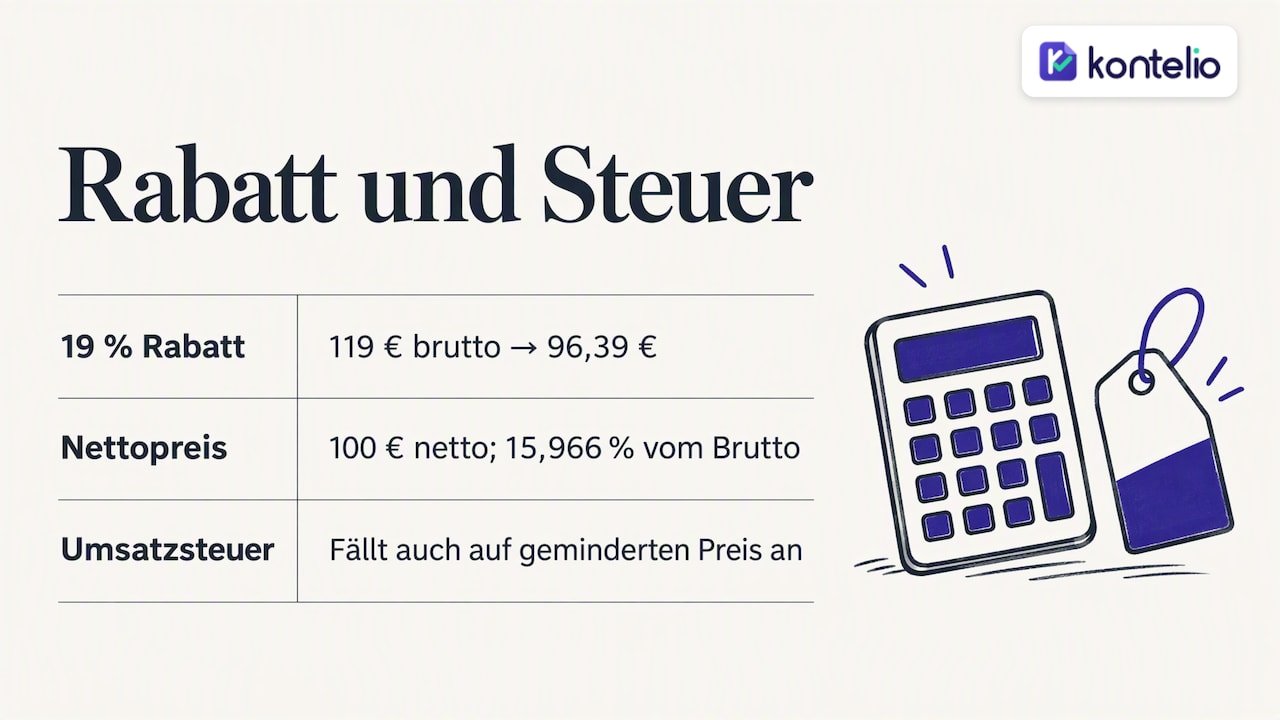
For your invoice, this means: if you promise a private customer “the Mehrwertsteuer (VAT) on us”, decide beforehand whether you deduct 19% from the gross price or take the net price as the final price. Then write the discount on the invoice as an amount. VAT is still due, just on the reduced price.
Discounts with different tax rates
If an invoice contains items at 7% and 19%, you must break down the consideration by tax rate. § 14 Abs. 4 Nr. 7 UStG expressly requires this. A total discount must therefore be distributed proportionally across both tax rates, otherwise the tax shown will be wrong.
Example: at a reading, an author sells a book (7%, €50.00 net) and a workshop set with materials (19%, €100.00 net) and grants 10% off everything.
| Tax rate | Net before discount | 10% discount | Net after discount | VAT | Gross |
|---|---|---|---|---|---|
| 7% | €50.00 | −€5.00 | €45.00 | €3.15 | €48.15 |
| 19% | €100.00 | −€10.00 | €90.00 | €17.10 | €107.10 |
| Total | €150.00 | −€15.00 | €135.00 | €20.25 | €155.25 |
The easiest way to avoid mistakes with mixed tax rates is to give the discount directly per line item. You can find more on the rates and on input VAT in our guide to Umsatzsteuer for the self-employed.
Special case: Kleinunternehmer
If you use the Kleinunternehmerregelung (small-business VAT scheme), you do not show any VAT. The discount then simply reduces the invoice amount, and the breakdown by tax rates is not needed. The note on the tax exemption remains important; we explain it in our article on the Kleinunternehmer invoice.
How to word the price reduction
Good wording is short and unambiguous. It states what the reduction refers to, how large it is and why it is granted. These variants have proven themselves:
Discount granted immediately
- „abzgl. 10 % Treuerabatt auf Position 1: −200,00 €“ (less 10% loyalty discount on item 1: −€200.00)
- „Mengenrabatt ab 50 Stück, 5 %: −112,00 €“ (volume discount from 50 units, 5%: −€112.00)
- „Nachlass laut Angebot Nr. 2026-041 vom 3. September: −150,00 € netto“ (discount as per quote no. 2026-041 of 3 September: −€150.00 net)
- „Der Rabatt ist im Rechnungsbetrag bereits berücksichtigt.“ (The discount is already included in the invoice amount.)
Agreed price reduction, amount still open
For bonuses and discounts that are only fixed later, the IHK Frankfurt and the IHK Ostthüringen suggest notes such as:
- „Es bestehen Rabatt- oder Bonusvereinbarungen.“ (Discount or bonus agreements are in place.)
- „Entgeltminderungen ergeben sich aus unseren aktuellen Rahmen- und Konditionsvereinbarungen.“ (Reductions in consideration result from our current framework and terms agreements.)
It becomes even safer if you name the agreement specifically, such as „gemäß Rahmenvertrag vom 12. Januar 2026“ (according to the framework contract of 12 January 2026). Then any auditor will find the relevant document immediately.
What you should avoid
- Vague lines such as “special price” without an original price.
- A discount without stating whether it is net or gross.
- A discount placed below the VAT line so that it looks as if it reduces the tax.
Discount, Skonto and bonus: the difference
All three ultimately reduce the consideration, but at different times and for different reasons. This affects what appears on the invoice.
| Discount | Skonto | Bonus | |
|---|---|---|---|
| Reason | Loyalty, volume, promotion, negotiation | Payment within a short period | Turnover achieved in a period |
| Timing | At or before the invoice | At payment | Usually after the end of the period |
| On the invoice | As a deduction with an amount | As a note with rate and deadline | As a reference to the agreement |
| Tax | Immediately on the reduced amount | Only corrected when taken | Corrected when granted |
For Skonto, according to the IHK Ostthüringen, an addition such as „2 % Skonto bei Zahlung bis …“ (2% Skonto for payment by …) is sufficient. The invoice amount initially remains the full amount, because when writing it you do not yet know whether the customer will take the Skonto. A discount, on the other hand, is included in the amount immediately. Discount and Skonto can be combined: the Skonto is then calculated from the already discounted gross amount.
Price reduction after the invoice: what applies then
If a customer complains about a service and you then grant them a price reduction, the consideration has changed. Under § 17 UStG, you must then correct the VAT owed, and your customer, if entitled to deduct input VAT, must correct their Vorsteuerabzug (input VAT deduction). The correction is made for the period in which the consideration changed, i.e. in the UStVA (periodic advance VAT return) for that month or quarter.
Here is how to proceed in practice:
- Record the price reduction in writing, for example by email with amount and reason.
- Issue a correction document that clearly refers to the original invoice (invoice number and date) and shows the net reduction, the proportional tax and the gross amount.
- Record the document in the month of the change and reduce turnover and VAT there.
- Refund the amount to the customer or offset it against the open receivable.
This must be distinguished from a genuine error in the invoice, such as a forgotten agreed discount. In that case, the invoice itself is wrong and must be corrected or cancelled. Our guide to Stornorechnung and Rechnungskorrektur (cancellation and correction invoices) shows how to do this properly. For invoices covering advance payments and partial amounts, the price reduction must also be correctly offset in the final invoice; more on this in our article on the Abschlagsrechnung (progress invoice).
Posting discounts correctly
For bookkeeping, it again depends on the timing:
- Immediate discount on the invoice: You only post the reduced net amount as revenue and the VAT attributable to it. The discount itself does not appear as a separate item in the books; it is already included in the revenue.
- Subsequent price reduction or bonus: You post the amount as a revenue reduction and correct the VAT proportionally. This keeps the original turnover visible, and at year-end you can see how much price reductions have cost you.
- Skonto: If the customer takes Skonto, you post the difference as Skonto granted, also with a correction of the VAT.
In the EÜR (cash-basis income/expense statement), what ultimately counts is what was actually paid. Those who prepare a balance sheet first post the receivable in full and correct it when the reduction is granted. If in doubt, clarify with your tax advisor which accounts in your chart of accounts fit exactly, especially if you regularly grant bonuses or volume discounts.
Common mistakes on invoices with discounts
Discount errors affect not only you but also your customer. The Bremen finance department points out that recipients should check invoices for completeness and accuracy, because errors put the input VAT deduction at risk. A business customer will therefore send back an incorrect invoice. These are the mistakes we see most often:
- Tax calculated on the amount before discount. Then you show too much VAT and also owe it to the Finanzamt.
- Gross and net discounts mixed up. A “discount €100” without further detail leaves open which tax it contains.
- Total discount not split with mixed tax rates. The breakdown by tax rates is then missing, and with it a mandatory detail.
- Bonus agreed, note forgotten. If the bonus agreement is not mentioned on the invoice, a mandatory detail is missing.
- Goodwill reduction after the invoice without a document. Without a correction document, there is no basis for adjusting VAT and input VAT.
- Discount in the quote but not on the invoice. What was promised in the quote must be reflected in the invoice.
Our view: discounts are a calculation problem, not a wording problem
We see the same pattern among many self-employed people and small businesses. Granting the discount itself is easy. It gets difficult when it is entered manually into an invoice template: then the tax is calculated on the old amount, the discount ends up below the tax line, or the split between 7% and 19% is missing. None of these mistakes has anything to do with a lack of good will to get everything right. They happen because a spreadsheet does not know what the VAT Act requires.
Our advice is therefore simple: define the calculation rule once and then let your tool apply it. Discount always from the net amount, always as a separate line, always with a reference to the quote or agreement. And record every price reduction you grant after the invoice in writing, because you will need the document at the latest for the UStVA. Especially those who are just starting out or who work in a language other than German gain a lot when the software takes care of the logic and they can focus on the customer.
— Paulo
Writing invoices with Kontelio
With Kontelio, you write invoices and E-Rechnungen (e-invoices) in the ZUGFeRD and XRechnung formats, manage customers and suppliers, and capture receipts by photo. The figures flow directly into your EÜR and your UStVA, which you submit via the ELSTER (official e-filing portal) connection. Deadline reminders make sure no date slips through, and the interface can be used in multiple languages. You can test Kontelio free of charge for 30 days without a credit card. After that, the Start plan begins at €9.90 per month or €99 per year; you can find all plans on our page with the prices for Kontelio.
Frequently asked questions about discounts on invoices
Does a discount have to appear on the invoice?
Every reduction of the consideration agreed in advance must appear on the invoice, unless it is already reflected in the price. A discount deducted immediately is already included in the consideration, but you should still show it as a separate line for clarity. If the amount is not yet fixed, a reference to the written discount or bonus agreement is sufficient.
Is the discount deducted from the net or the gross amount?
On the invoice, you deduct the discount from the net amount and then calculate the VAT on the reduced amount. With a percentage discount, the arithmetic result is the same as a deduction from the gross amount. With fixed amounts, however, you must state whether net or gross is meant.
How do I write a discount on the invoice?
Write the original price, below it the discount with percentage and amount, such as „abzgl. 10 % Treuerabatt: −200,00 €“ (less 10% loyalty discount: −€200.00), and then the new net amount. Only after that come the VAT and the invoice amount. A short reason or a reference to the quote makes the line understandable for the customer.
What is the difference between a discount and Skonto?
A discount lowers the price immediately and appears as a deduction on the invoice. Skonto is a reduction for fast payment that only appears on the invoice as a note with a percentage and deadline. With Skonto, the VAT is only corrected when the customer actually takes it.
What do I do if I forgot the discount?
If the discount was agreed and is missing from the invoice, the invoice is incorrect. If the customer has not yet paid, you correct it; if payment has already been made, you issue a Stornorechnung (cancellation invoice) and then a new, correct invoice. If you are unsure, especially with large amounts or mixed tax rates, have your tax advisor check the correction.
Sources
- Umsatzsteuer-Anwendungserlass, section 14.5: Mandatory invoice details (BMF)
- § 10 UStG: Taxable base for supplies of goods and services
- § 17 UStG: Change of the taxable base (BMF VAT handbook)
- IHK Ostthüringen: Mandatory details on invoices
- IHK Frankfurt am Main: Invoices, mandatory details on the invoice
- Verbraucherzentrale NRW: “VAT on us” in discount promotions
- Senator for Finance Bremen: Information sheet on invoice requirements
Recommendations
This article was machine-translated from German. Only the German version is authoritative.