Cash-basis profit statement (EÜR)
Check the Anlage EÜR per activity and year, finalise it and transcribe it field by field into ELSTER.
Available in the plans: Business Pro
Under Cash-basis income statement (EÜR) Kontelio calculates the Anlage EÜR, the official form of the Einnahmenüberschussrechnung (cash-basis profit statement): your profit as business income minus business expenses of a calendar year. There is one Anlage EÜR per activity. Kontelio does not file it: you transcribe the values into ELSTER with your income tax return (or your tax adviser does) and then record the filing here.
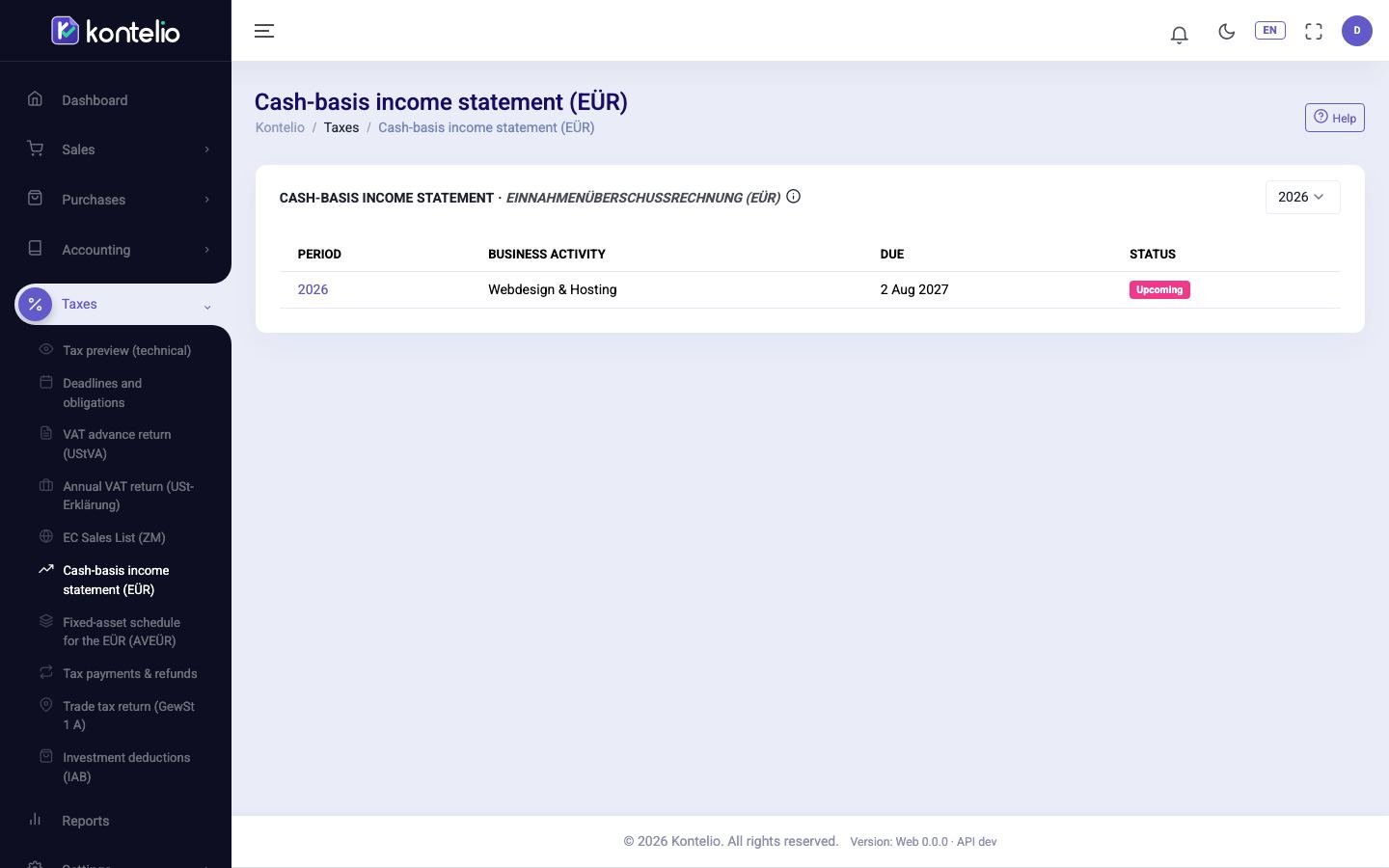
Open an Anlage EÜR
- Choose the year at the top. The list shows one row per activity with Due and Status.
- Click the year in the row of the activity.
- In the return, change the year with the arrows and the activity with the Business activity selector.
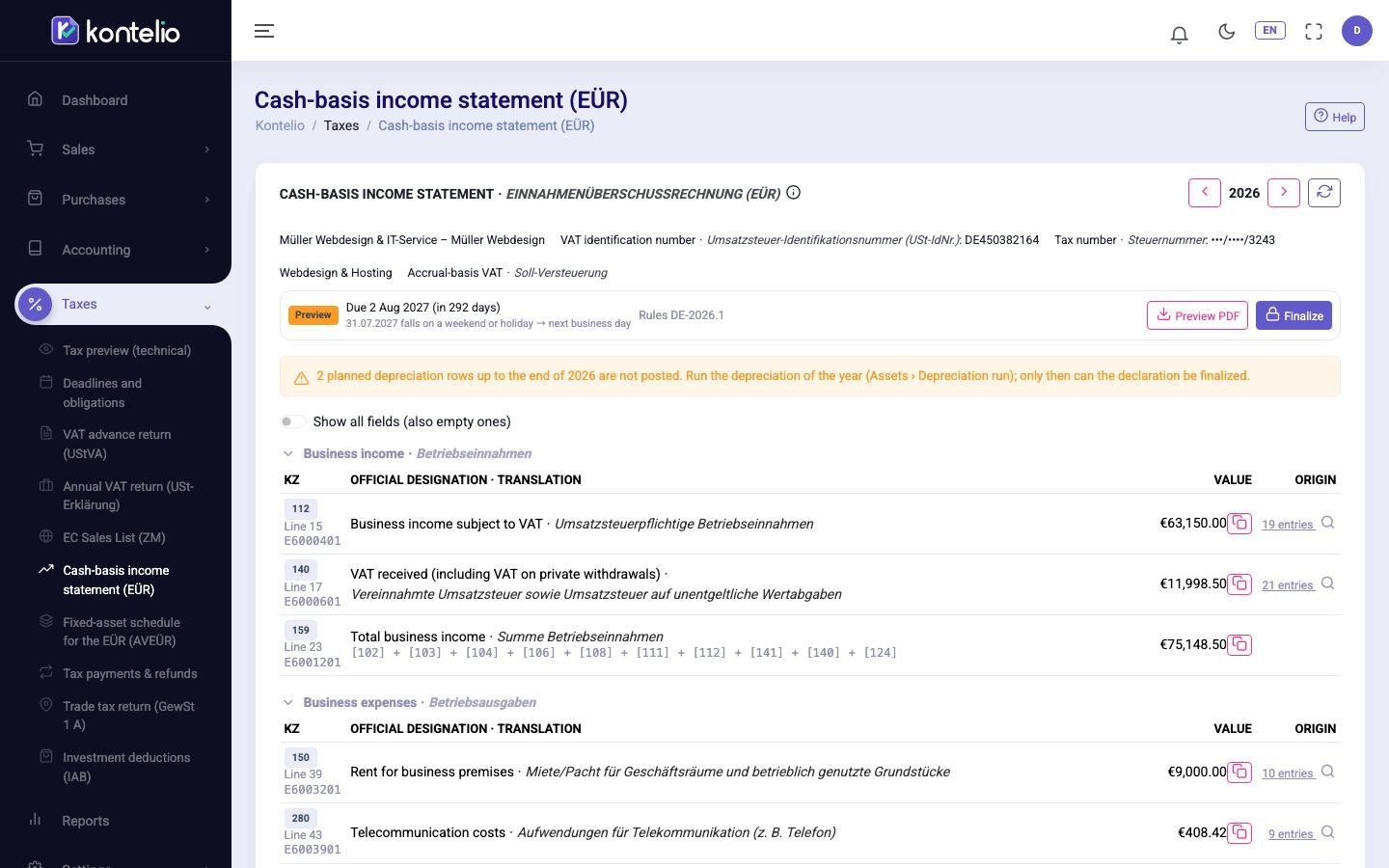
The sections follow the form, for example business income and business expenses. Each row shows the Kennzahl, the line, the name of the ELSTER field (for example E6000401), the official label and the value. At the bottom is the result, Profit or Loss. Total fields show their formula; for all others the number of postings under Origin opens the accounts, postings and documents behind them.
Some fields are davon ("of which") entries: they repeat part of another field and are not added to the total a second time. Field 153 (E6004015), for example, shows the maintenance costs of your business premises (upkeep, renovation, cleaning, workplace safety) that are already included in field 151. Trade tax and non-deductible fines do not appear in the Anlage EÜR; they do not reduce the profit.
What Kontelio does not fill in
At the end of the return there may be an expandable notice that some lines of the official form are not covered by Kontelio. No account is assigned to these lines, so Kontelio leaves them empty, for example a reserve under § 6b EStG (Rücklage nach § 6b EStG). If one of them applies to you, enter it yourself in ELSTER or talk to your tax adviser. Investment deductions are not among them: they come from the IAB register (next section).
Investment deductions in the Anlage EÜR
Kontelio fills in the lines for the Investitionsabzugsbetrag (IAB) — the investment deduction — from the register under Investment deductions (IAB), not from postings. In the 2024 to 2026 forms these are:
| Zeile | Content | Source |
|---|---|---|
| 88 | Deduction: the IABs of the year, drafts included, minus the reversals for this year | IAB register, one Einzelangabe (itemised entry) per IAB |
| 84–86 | Hinzurechnungen (additions back to profit) for the assets of the year: Zeile 86 for IABs of the previous year, 85 for IABs from two years earlier, 84 for IABs from three years earlier | Assignments, one Einzelangabe per asset (acquisition cost, Hinzurechnung, Herabsetzung) |
| 35 | Herabsetzung (reduction) of the acquisition cost under § 7g Abs. 2 EStG | Amount from the posting of the Herabsetzung, Einzelangaben per asset from the register |
| 34 | Sonderabschreibung (special depreciation) under § 7g Abs. 5 EStG | Postings of the depreciation run, see Fixed assets |
The Einzelangaben are shown below the field they belong to, each with its own copy icon for ELSTER.
Below the table, the Investment deductions (IAB) section summarises the year of the business: newly created IABs, Added back to profit (Hinzurechnungen), Reduction of asset costs (Herabsetzungen), Reversals this year (Rückgängigmachungen) and open items. See details opens the register of this business. If the business has neither IABs nor open items for the year, the section is not shown.
If the provisional profit before IAB is within the limit of § 7g EStG and the business has no IAB for the year yet, a neutral hint about the possibility of an IAB may appear (in advanced mode only if you have switched on all hints). Whether you use it is your decision.
Finalise, transcribe and record
- Click Finalize, confirm the notices and then Finalize. The return is created in the background; you can close the dialog and will be notified.
- Click Prepare filing. Transcribe each value with the copy icon (⧉) into the Anlage EÜR in ELSTER, into the field with the same line, and tick it.
- After filing, click Register filing and record the date, Transferticket and, if you have it, the transmission protocol.
Statuses, versions, differences and corrections work as for the VAT return, see VAT return (UStVA).
Good to know
- The Anlage EÜR is an annex to the income tax return. Kontelio prepares only the annex, not the income tax return itself.
- Which activities exist, their type (freelance or trade) and their tax number are set under Business activities. The tax number of the activity is shown in the header of the return.
- The general deadline is 31 July of the following year, see Deadlines and obligations.
- For an activity of the type trade, the trade tax return takes the profit from this Anlage EÜR.
- If you have access to some activities only, you see only their Anlage EÜR.