Taxpayer
Set the business owner's master data, the VAT regime and the conversion of foreign currencies.
Under Taxpayer you maintain the details about you as the business owner: name, legal form and address, which appear on invoices and in returns, the VAT regime with its history and the method used to convert foreign-currency amounts for VAT. The basic data comes from the setup when you first started.
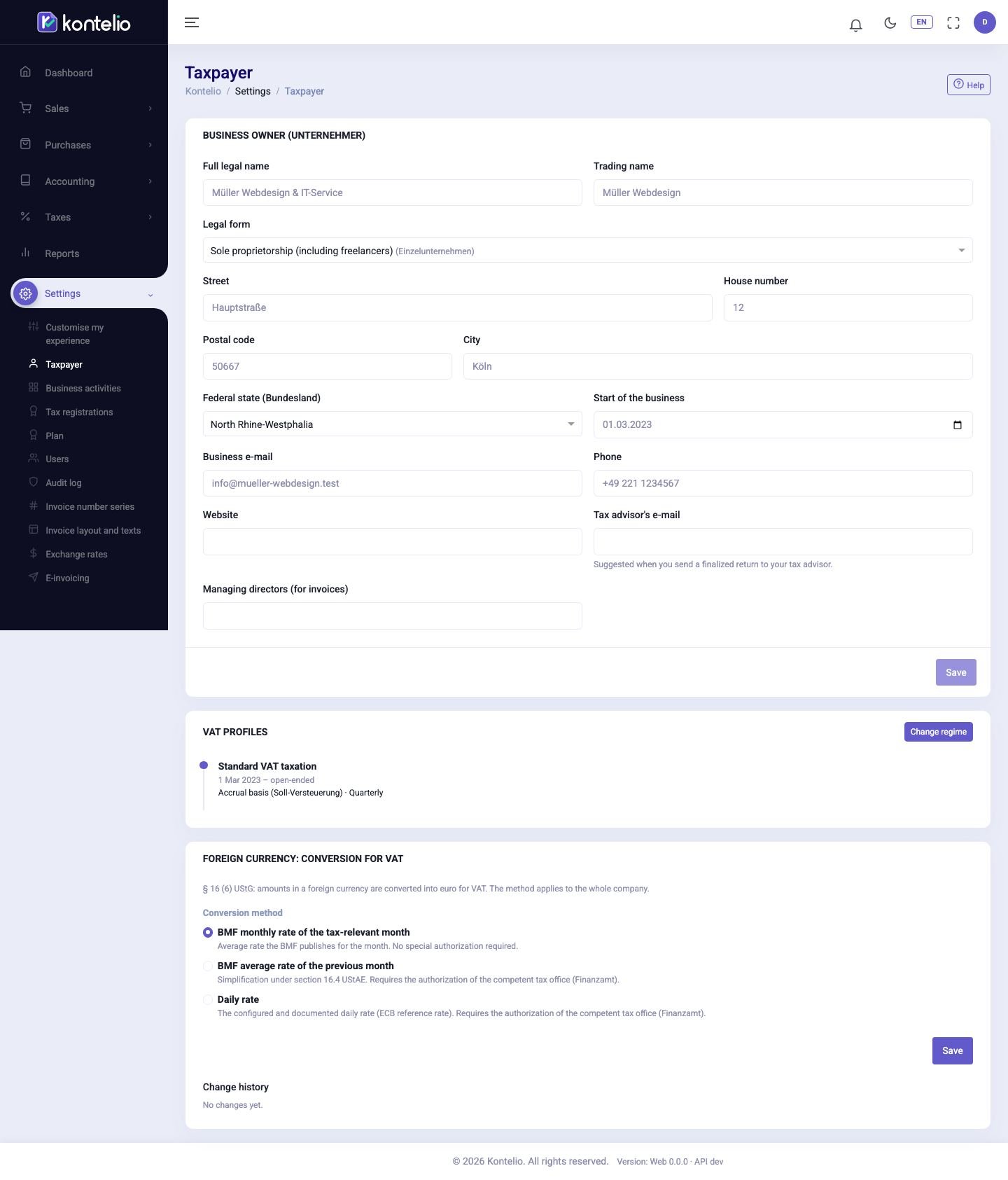
Change the master data
- In the Business owner (Unternehmer) card, change the fields you need.
- Click Save. The button only becomes active once you have changed something.
| Field | Meaning |
|---|---|
| Full legal name | The name under which the tax office knows you. For a sole proprietorship, your first name and surname. |
| Trading name | Optional name under which you trade. |
| Legal form | For legal forms with a commercial register entry, Register court and Commercial register number also appear. |
| Start of the business | No business activity can start before this date. |
| Tax advisor's e-mail | Suggested when you send a finalised return to your tax adviser. |
| Managing directors (for invoices) | Appears on your invoices if filled in. |
The postcode has five digits; name, street, town and start date are required.
Change the VAT regime
The VAT profiles card shows every regime that has ever applied, with validity period, taxation method and filing frequency. A regime is never overwritten; a change starts a new one.
- Click Change regime.
- Under New regime valid from, enter the first day of the new regime, usually the first of a month. The previous regime ends the day before.
- Choose the VAT regime. With Standard VAT taxation, also choose the Taxation method and the Filing frequency of the VAT advance return and, where applicable, the permanent filing extension.
- Click Save.
Convert foreign currencies
In the Foreign currency: conversion for VAT card, choose under Conversion method how invoices and expenses in a foreign currency are converted into euros for VAT. The method applies to the whole business.
- BMF monthly rate of the tax-relevant month needs no approval and is the default.
- BMF average rate of the previous month and Daily rate may only be used with the tax office's approval. Kontelio then requires you to tick I confirm that the required authorization of the tax office (Finanzamt) exists. and enter the Authorization date; you can add the authority, reference and the Authorization letter.
Click Save. Every change appears under Change history.
Good to know
- All users with access to the settings see this page; only owners, administrators and the tax adviser may change it.
- Every change is recorded in the Audit log. If two people save at the same time, the last one does not simply win: Kontelio reports the conflict.
- You maintain the Steuernummer and USt-IdNr. under Tax registrations, and your business activities under Business activities.
Simplified mode
In the Simple mode you find the same details under My business, split into the Details, Taxes (VAT), Tax numbers and Activities tabs. Saving works exactly as here.